
Track and Analyze
Repair Processes
Increase your product traceability and insight into the actual root causes of your failures by adding relevant repair information to your unit history. WATS supports multiple ways to get your repair data into the system, whatever fits your workflow.
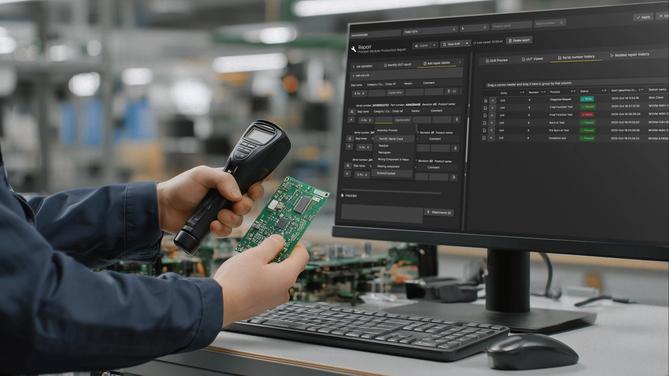
Log Customizable Repair Operations directly
Capture repair data right where it happens with no spreadsheets and no delays. The operator interface lets your operator log customizable repair operations directly in WATS, linked to the failed step and test report.
Tailored Repair Categories
Assign standardized repair codes, categories, and failure types to each operation for better consistency and traceability.
Component-Level Detail
Add references to affected components, attach images, and document root causes for smarter troubleshooting later.
Subunit Replacement
Replace modules or subunits directly from the interface, keeping your full unit history accurate and complete.
Designed for Efficient Repair Workflows
From scanning to root cause analysis. These features reduce failures, save time, and gives you instant access to the full serial number history.
Barcode Scanning Built-In
Scan units and components directly in to speed up identification and eliminate manual entry. The Repair Operator Interface uses HTML5 technology to allow you to connect directly to accessories such as barcode scanners and cameras.
Quick Access to Repair Records
Filter and review past repairs by failure type, component, or test step — no need to dig through spreadsheets.
Serial Number History
Get instant access to the full serial number history, along with statistics informing about the most frequent historical repair types for the failed test steps.

Everything you need to know.
to get started with Repair Analytics
Explore more videos
WATS Repair Interface
This video gives a quick introduction to logging repair operations in WATS.
Quick overview of WATS Repair Analysis
A short introduction to repair analysis in WATS.
WATS Operator Interface
Short Introduction to the operator interface including repair interface.Choose the Repair Input That Fits Your Workflow
WATS supports multiple ways to get repair data into the system. Making it easy to get started and adapt to your organization’s workflow. The goal is the same: build a complete unit history and get full value from your repair insights.
Log Repair Operations Directly
Create and submit Repair reports directly inside the WATS Operator Interface. Allows operators to log Unit Under Repair (UUR) data. Ideal for on the spot repairs. The data is stored in real-time and linked automatically to any related product/test history.
REST API Submission
Send repair reports via the WATS REST API. Suitable for automated data flows from Manufacturing Execution Systems, repair tracking systems, or other custom applications.
Enterprise Connection
Configure an Enterprise Connection to forward/import repair data from another WATS instance. Useful for multi-site or multi‑system setups, enabling centralized analysis from distributed manufacturing/repair systems.

Learn More About WATS Product Features
Test Data Analytics

Test step analysis provides powerful tools to analyze your specific test steps of one or more sequences. Analyze your test steps in depth and find roo...
Root Cause Analysis with AI

The WATS Process Heatmap turns complex data into intuitive, actionable insights. Drill down from high-level insights to the exact test steps causing t...

